A few months ago, someone sent a message through my contact form: legit email address, legit website, and a legit-looking 12-page RFP with a $45K budget, for a site build and performance project where the previous vendor had walked away and left $30K of budget on the table.
I looked into the company. Real overseas e-commerce operation, VAT registration and all. The RFP read like it was written by someone who knew what they were buying.
Fake RFPs come through my contact form regularly, so every inbound like this is unproven until it survives vetting. This one was surviving. I kept it moving because I wanted to see where it went.
The courtship
We exchanged several rounds of email clarifying points of the RFP. Every response was well written and professional. He’d gone through my case studies and called out specifics he was impressed by.
The one oddity was an outlook.com email address. Plausible, if he really was the marketing contractor he claimed to be. I noted it and kept the conversation going.
We agreed on next steps. A cursory look at the existing build to vet the project, then paid discovery.
The turn
Then came staging access. He said he’d need my Google email address to add me to their whitelist.
The phrasing was off, and it moved him from unproven to suspect. But he already had my email address, so confirming that it was my Google account gave him nothing. I wanted to see the next move.
The next move was a link to a WordPress staging site, with instructions to use the Google login button, not the WordPress login.
There it was. Nobody who runs a staging environment tells you which login button to click.
The catch
I wasn’t going to click that button, but I did want to see what they’d built. So I copied the Google login button’s link and opened it in an incognito window. This is what came up:
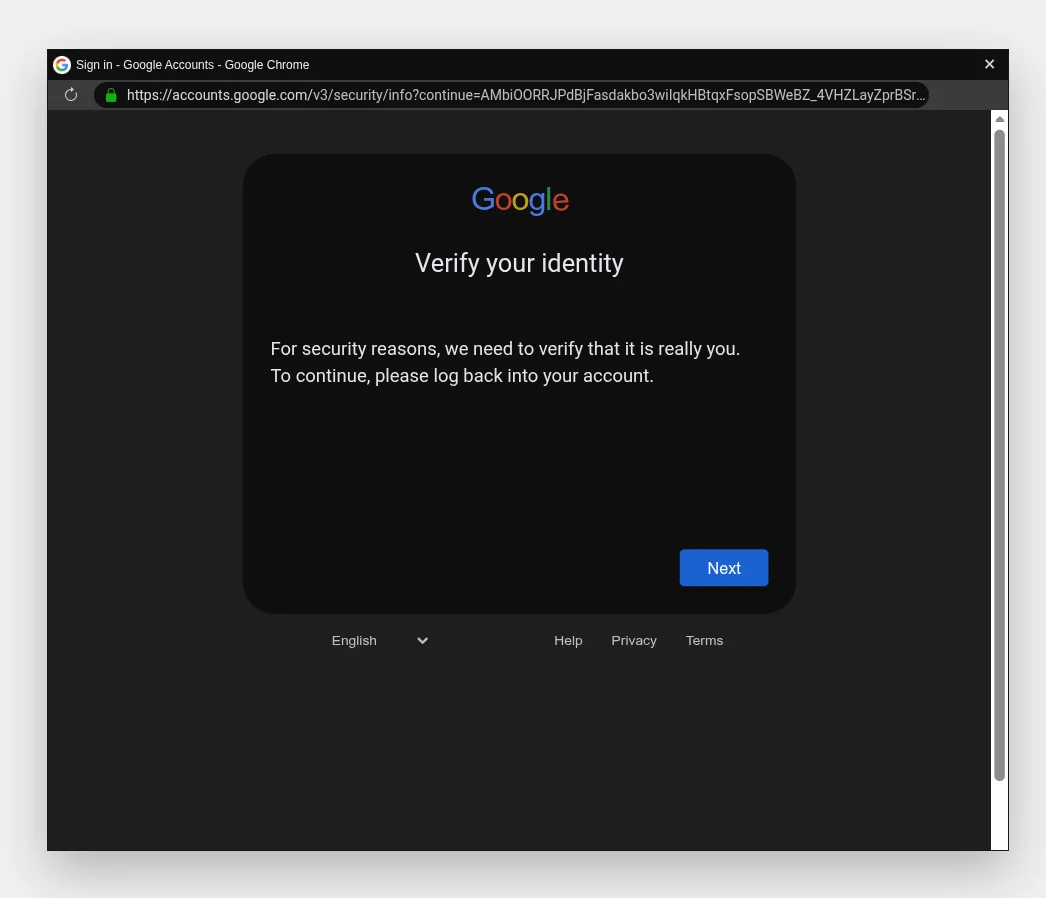
Convincing, except Google sign-in doesn’t present itself as a browser window inside your browser window. That fake Chrome popup, complete with a fake address bar showing accounts.google.com and a fake padlock, is a technique called browser-in-the-browser phishing. The “window” is HTML, and the padlock is a drawing of one.
I viewed the frame source. The modal was hosted on a .click domain. Then I took a harder look at the staging URL itself: it was one character off from the company’s real domain. Someone had registered a typosquat of a real business and built a fake staging site on it.
Add it up: a real company used as cover, a professionally written 12-page RFP, weeks of patient correspondence, and flattery calibrated to my own case studies, all engineered to get one developer to type his Google Workspace password into a fake modal.
I reported both domains to Google Safe Browsing and blocked the address. Their investment: weeks. Their payoff: nothing.
It wasn’t isolated
That was the most sophisticated attempt I’ve seen. It wasn’t the only one.
Four other fake RFPs have come through my contact form in recent months. Less effort behind those: the follow-up emails were fine, but a LinkedIn search showed no record of the sender working for the company they claimed to represent.
In late 2024, a hiring manager at WP Engine received a resume from someone claiming to own 84EM. He found the claim implausible, looked through this site, and reached out through my contact form to verify. Five minutes of checking on his end unraveled it.
And last week, someone impersonated 84EM directly, emailing one of our clients from a lookalike Gmail address with a pitch for WordPress maintenance work. The client caught it and flagged it. Full details, including the email itself, are on the security notice page.
The tells are gone
Notice what’s missing from every one of these: broken English, ugly design, implausible stories. The tells that used to filter scams out for you.
AI did that. The same tools I use every day to write code and draft documents also write clean follow-up emails and build pixel-perfect login pages, because scammers upgraded their tooling like everyone else did.
What it means practically: instinct isn’t enough anymore, because instinct works on tells and the tells are gone. What still works is verification, a habit you build, not a talent you either have or don’t.
The habits
Here’s what caught these, and what’s worth making automatic:
- Read the domain character by character. Typosquats survive a glance. They don’t survive a careful read.
- Verify people through an independent channel. If someone claims to work for a company, check LinkedIn or call the number on the company’s website. Don’t use contact info they gave you.
- Never authenticate through a link someone sent you. If a legitimate service needs you to sign in, go there yourself and sign in.
- Know the browser-in-the-browser tell. A real sign-in popup is a real window you can drag around your screen. A “window” that’s stuck inside the page is HTML pretending.
- Slow down the moment credentials or money enter the conversation. That’s the destination of every long con. Everything before it is setup.
None of this is sophisticated, and that’s the point: the person behind that RFP spent weeks building the con, and it fell apart in about ninety seconds once the login ask arrived, because the checks are cheap and they don’t care how good the story is.
They’ll have to try harder next time.